So far we have been using CommonCrypto when it has come to creating hashes of data. I even wrote about it some time ago and presented a thin layer on top of it making it more convenient to use. In WWDC’19 Apple presented a new framework called CryptoKit. And of course, it contains functions for hashing data.
SHA512, SHA384, SHA256, SHA1 and MD5
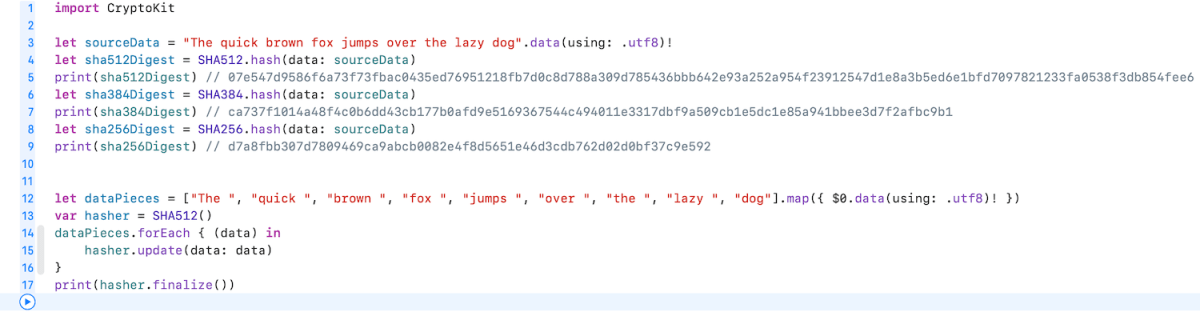
CryptoKit contains separate types for SHA512, SHA384 and SHA256. In addition, there are MD5 and SHA1 but those are considered to be insecure and available only because of backwards compatibility reasons. With CryptoKit, hashing data becomes one line of code.
This file contains hidden or bidirectional Unicode text that may be interpreted or compiled differently than what appears below. To review, open the file in an editor that reveals hidden Unicode characters.
Learn more about bidirectional Unicode characters
In case we do not have the whole data available in memory (e.g. really huge file), new types support creating hash by feeding data in piece by piece (just highlighting here how to use the hasher with incremental data).
This file contains hidden or bidirectional Unicode text that may be interpreted or compiled differently than what appears below. To review, open the file in an editor that reveals hidden Unicode characters.
Learn more about bidirectional Unicode characters
Apple has an excellent playground describing the common operations developers need when using CryptoKit. Highly recommend to check it out if you need something more than just creating hashes.
Summary
CryptoKit is long waited framework what is easy to use and does not require managing raw pointers what was needed to when using CommonCrypto. It now just takes some time when we can bump deployment targets and forget CommonCrypto.
Looking for hashing data using CryptoKit? Please navigate to here.
In this post we will look into how to add CommonCrypto to a Xcode project and how to generate hash using SHA256.
Adding CommonCrypto as a module
Note: Since Swift 4.2, this step is not necessary and manually added CommonCrypto module must be removed.
CommonCrypto library can be added in two ways: importing it in the Objective-C bridging header or by using module maps.
The first option makes sense for projects having both Objective-C and Swift code. In this case Objective-C bridging header is already part of the project and therefore adding #import to the bridging header is the quickest way.
The second option is more suitable for pure Swift projects as it enables to avoid adding the bridging header (although it is up for everyone’s preference).
Adding CommonCrypto as a module consists of two steps. Firstly, we need to create a folder named ‘CommonCrypto’ in the same folder as the Xcode project file is. Then we need to create a file ‘module.map’ and save it to ‘CommonCrypto’ folder.
This file contains hidden or bidirectional Unicode text that may be interpreted or compiled differently than what appears below. To review, open the file in an editor that reveals hidden Unicode characters.
Learn more about bidirectional Unicode characters
Secondly, we need to open the project in Xcode, then navigating to ‘Build Settings’ of the target and adding $(PROJECT_DIR)/CommonCrypto/ to ‘Import Paths’.
That’s it, now Xcode knows where the module is located and it can be imported in Swift files.
Hashing data using SHA256 algorithm
CommonCrypto contains a function named CC_SHA256(…) what takes in data, the count of bytes and gives a pointer to the hash of the data. As the function operates on the data, it makes sense to extend Data. We’ll add a function what can be later on extended for adding support for other hashing algorithms as well (see here for other algorithms).
This file contains hidden or bidirectional Unicode text that may be interpreted or compiled differently than what appears below. To review, open the file in an editor that reveals hidden Unicode characters.
Learn more about bidirectional Unicode characters
This file contains hidden or bidirectional Unicode text that may be interpreted or compiled differently than what appears below. To review, open the file in an editor that reveals hidden Unicode characters.
Learn more about bidirectional Unicode characters




 Augmented Code