Categories
Swift Xcode

Changes to structured logging in Xcode 15

Apps log a lot of information to the debug console in Xcode which at some point might get overwhelming and makes it difficult to understand what is going on. The information of what we are interested in when debugging an app might get overflown with information coming from other parts of the app. Everyone who have worked on apps which log a lot to console are more than happy to learn that Xcode 15 finally supports filtering console logs. No need to launch the Console.app any more if we want to get filtered console logging, we can forget that workaround. Let’s dive in how structured logging works alongside with Xcode 15.

For getting the full benefit of the new Xcode 15 update, we should be using Apple’s structured logging APIs. The logging APIs got an update in iOS 14 with the introduction of a Logger type. Before that, we used to use os_log functions. Here is an example of how to use the Logger type. My personal preference has been extending the Logger type in each of the module (target) with convenient static variables, which enables auto-completion.

import os

extension Logger {
    static let subsystem = Bundle.main.bundleIdentifier!

    static let networking = Logger(subsystem: subsystem, category: "Networking")
    static let presentation = Logger(subsystem: subsystem, category: "Presentation")
}

Let’s add some logging to a view model, which in turn uses a service class to fetch statements. The prepare method is called from view’s task view modifier.

@Observable final class ViewModel {
    let service: StatementService

    init(service: StatementService) {
        self.service = service
    }

    private(set) var statements = [Statement]()

    func prepare() async {
        Logger.networking.debug("Starting to fetch statements")
        do {
            self.statements = try await service.fetchStatements()
            Logger.networking.notice("Successfully fetched statements")
        }
        catch {
            Logger.networking.error("Failed to load statements with error: \(error)")
        }
    }
}

The debug console view in Xcode 15 looks like this by default when running our sample app.

If we want to inspect a single log line then we can click on it and pressing space which opens a quick look window.

Here we can see all the metadata attached to the log. Note the subsystem and category lines, which come from the information passed into the Logger’s initializer.

Often we want to see some of this metadata directly in the debug console view. This can be configured using “Metadata Options” picker.

If we want to jump to the source file and location then we need to hover on the log line and a jump button appears in the bottom right corner – very handy.

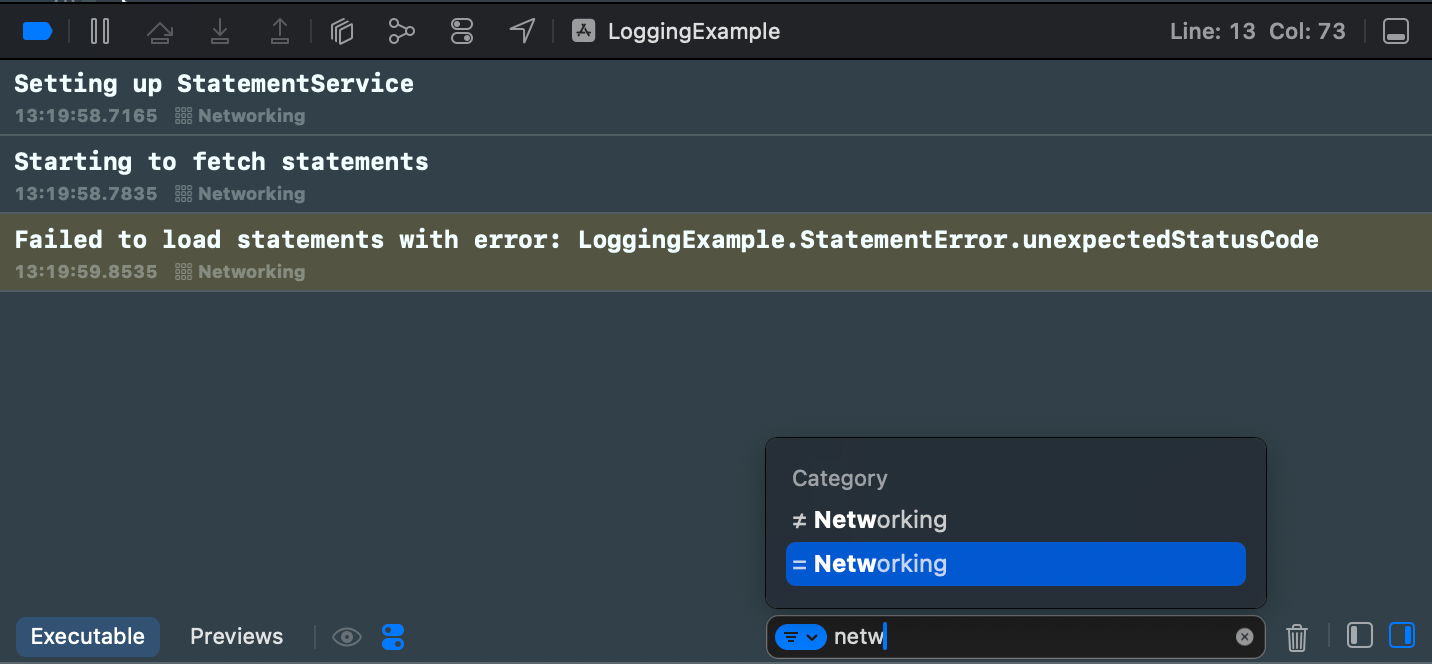
Logs can be filtered using the find bar. The find bar suggests filtering options. If I want to filter to log events which have category set to “Networking” then only thing I need to do is typing “netw” to the find bar, and already it provides me a quick way to apply this filter. Really, really handy.
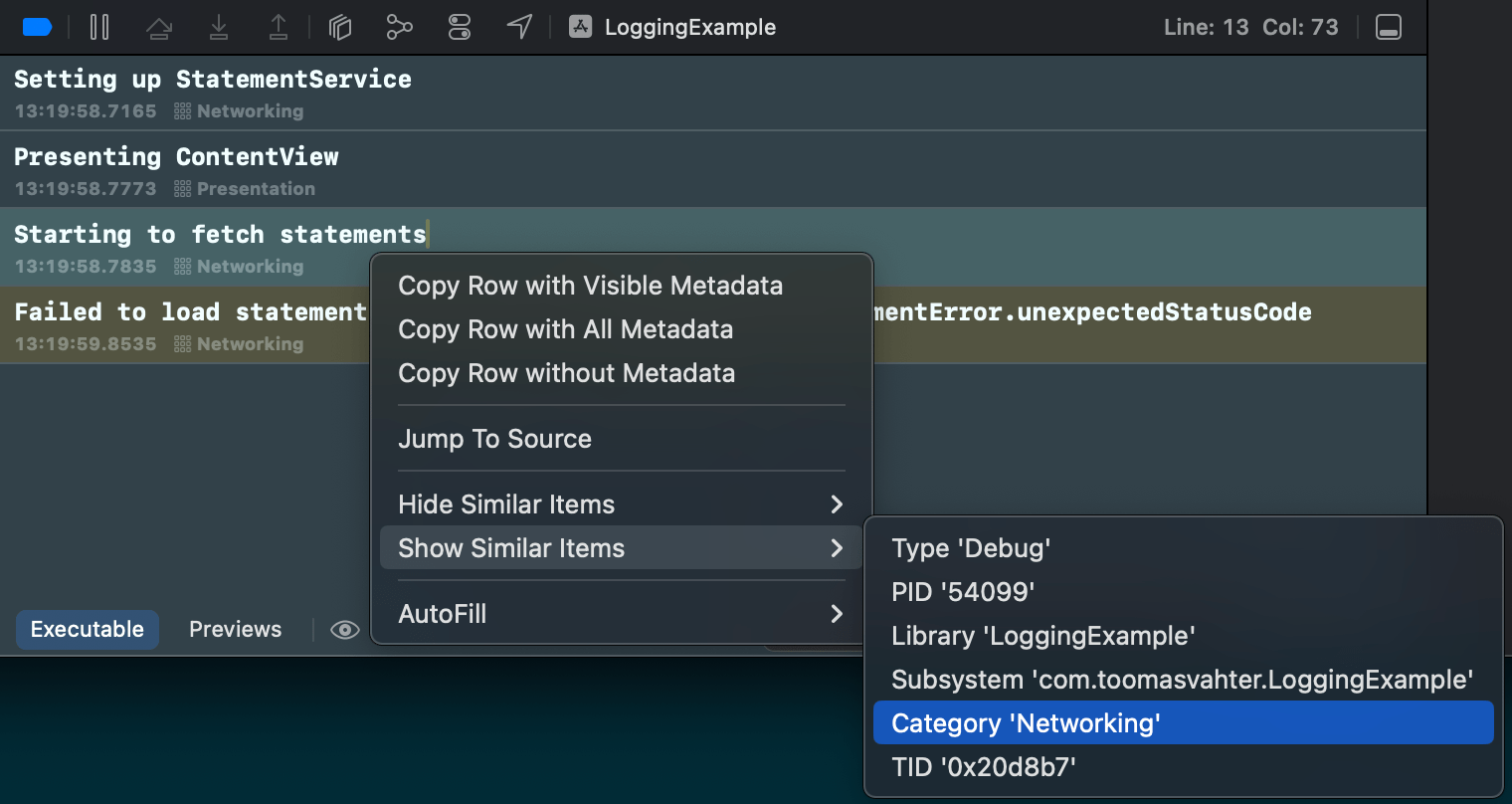
There is also a second way how to achieve the same filtering. Right-clicking a log entry and selecting Show Similar Items > Category ‘Networking’.
If this was helpful, please let me know on Mastodon@toomasvahter or Twitter @toomasvahter. Feel free to subscribe to RSS feed. Thank you for reading.

Categories
iOS macOS Swift

Custom string interpolation in Swift

ExpressibleByStringInterpolation is a protocol which makes it possible to compose strings with expressions evaluated at runtime. Interpolated strings are created with adding a \(some code) to a string. Those expressions are evaluated and a final string is created. This protocol, among other things, enables customizing strings what are created by those expressions. At the end of the post we have created a custom interpolation type which handles encodable and string representable types.

ExpressibleByStringInterpolation is a protocol which enables a type to be initialized with string interpolation. The protocol inherits from multiple other protocols, when going from top to down then it looks like this: ExpressibleByStringLiteral, ExpressibleByExtendedGraphemeClusterLiteral, and ExpressibleByUnicodeScalarLiteral. So it is a total of 4 levels of inheritance. That is important to know because if we add the protocol to a custom type then Xcode tells us about many functions the custom type needs to implement. Many of these functions already provide default implementation.

Let’s start with adding custom types Entry add EntryStorage. The storage type just keeps a collection of entries. The entry, for now, contains a string value, but we will expand the type in a way that the storage’s add function can be called with a string interpolation: storage.add("Entry (index)"). It will be very similar to OSLogMessage in Apple’s os framework.

struct EntryStorage {
private(set) var entries: [Entry] = []
mutating func add(_ entry: Entry) {
entries.append(entry)
}
}
struct Entry {
private(set) var value: String
}

With this set, let’s add ExpressibleByStringInterpolation conformance to the Entry type along with a custom interpolation type: EntryInterpolation. ExpressibleByStringInterpolation protocol comes with an associatedtype StringInterpolation which is by default set to DefaultStringInterpolation. If we want to use custom interpolation type then we can implement the init(stringInterpolation: EntryInterpolation) with the custom type and Swift will understand that we’ll be using our own type here. No need to add typealias StringInterpolation = EntryInterpolation (although we could for clarity). The custom EntryInterpolation type needs to conform to protocol StringInterpolationProtocol. The protocol requires us to implement an init method and a appendLiteral function. The custom type will have a property for storing multiple interpolated values because it needs to represents all the expressions in a single string. For example: "Text (expression1) more text (expression2)".

struct Entry: ExpressibleByStringInterpolation {
// typealias StringInterpolation = EntryInterpolation
private(set) var value: String
init(stringLiteral value: String) {
self.value = value
}
init(stringInterpolation: EntryInterpolation) {
self.value = stringInterpolation.values.joined()
}
}
struct EntryInterpolation: StringInterpolationProtocol {
private(set) var values: [String]
init(literalCapacity: Int, interpolationCount: Int) {
self.values = []
}
mutating func appendLiteral(_ literal: StringLiteralType) {
values.append(literal)
}
}

With this implementation we can write code which looks like this:

var entryStorage = EntryStorage()
entryStorage.add("Entry 1")

Note that the add method takes an argument of the type Entry but here we are passing a string to the function. This works because the Entry type conforms to the ExpressibleByStringLiteral protocol which the ExpressibleByStringInterpolation includes.

Now we have basics set up and we can go and add additional functions to the EntryInterpolation type. At first, we’ll add a generic function enabling us to create interpolated strings with expressions which return a type conforming to the CustomStringConvertible protocol. There are numerous types which implement this protocol and therefore we get a support of interpolating each of those. For example, Int and Array types conform to it.

extension EntryInterpolation {
mutating func appendInterpolation<T: CustomStringConvertible>(_ value: T) {
values.append(value.description)
}
}
let index = 2
let items = ["Item 1", "Item 2"]
entryStorage.add("Entry \(index): items=\(items)")
// Entry 2: items=["Item 1", "Item 2"]

Sometimes we might want to pass in encodable types directly with customizable formats. Note how the interpolated expression gets a support to the custom format argument. That is because Swift converts each of the expressions to calls to appendInterpolation which can have additional arguments.

extension EntryInterpolation {
mutating func appendInterpolation<T: Encodable>(_ value: T, jsonFormat: JSONEncoder.OutputFormatting = [.prettyPrinted, .sortedKeys]) {
let encoder = JSONEncoder()
encoder.outputFormatting = jsonFormat
let data = try? encoder.encode(value)
values.append(String(data: data ?? Data(), encoding: .utf8) ?? "invalid")
}
}
struct User: Encodable {
let name: String
let age: Int
}
let user = User(name: "Appleseed", age: 20)
entryStorage.add("Entry 3: \(user, jsonFormat: .prettyPrinted)")
entryStorage.add("Entry 3: \(user, jsonFormat: .sortedKeys)")
// Entry 3: {
// "name" : "Appleseed",
// "age" : 20
//}
//Entry 3: {"age":20,"name":"Appleseed"}

It is worth taking a look on the interface of the OSLogInterpolation type and all the appendInterpolation functions it implements. As seen so far, it is pretty easy to extend a custom interpolation type with functions like these.

If this was helpful, please let me know on Mastodon@toomasvahter or Twitter @toomasvahter. Feel free to subscribe to RSS feed. Thank you for reading.

Project

SwiftStringInterpolationPlayground (Xcode 12.4)