Categories
iOS Swift SwiftUI

Zoom navigation transition in SwiftUI

WWDC’24 brought a lot of new and SwiftUI received many updates. One of which, is the new NavigationTransition protocol and the zoom transition. And that is pretty much what it contains at the moment. A built-in way to add a zoom transition to the view. Easy to get going, but does not provide customization, at least for now.

Here is an example of a grid view which opens a DetailView with zoom transition. Here we can see that we need to add navigationTransition view modifier to the destination view and matchedTransitionSource view modifier to the view it starts the transition from.

struct ContentView: View {
let colors: [[Color]] = [
[.red, .blue, .green],
[.yellow, .purple, .brown],
[.cyan, .gray]
]
@Namespace() var namespace
var body: some View {
NavigationStack {
Grid(horizontalSpacing: 50, verticalSpacing: 50) {
ForEach(colors, id: \.hashValue) { rowColors in
GridRow {
ForEach(rowColors, id: \.self) { color in
NavigationLink {
DetailView()
.navigationTransition(
.zoom(
sourceID: color,
in: namespace
)
)
} label: {
RoundedRectangle(cornerRadius: 5)
.foregroundStyle(color)
.frame(width: 48, height: 48)
}
.matchedTransitionSource(id: color, in: namespace)
}
}
}
}
}
}
}
view raw Zoom.swift hosted with ❤ by GitHub

Just a few lines of code and we have a nice zoom transition in place.

If this was helpful, please let me know on Mastodon@toomasvahter or Twitter @toomasvahter. Feel free to subscribe to RSS feed. Thank you for reading.

Categories
Swift SwiftUI

Aligning views in different stacks in SwiftUI

While working on a SwiftUI view, I needed a way for aligning views in different stacks in a way that they are centred. Most of the time I can get away using default alignment values, what HStack and VStack provide. In that case I had two views in different stacks and I needed a way to centre align these views. Here is a view which has three labels in one VStack and 2 texts with an image in another VStack. This is just an example view for illustrating the real world case. The question is, how to align the top text “Hello, world!” with the image so that both are centre aligned.

The answer is to use alignment guides. If combining VStacks and HStacks does not work out, then we can take one step further and define a custom alignment for our views.

private extension VerticalAlignment {
private struct ImageTextAlignment: AlignmentID {
static func defaultValue(in context: ViewDimensions) -> CGFloat {
context[VerticalAlignment.center]
}
}
static let centeredImageText = VerticalAlignment(ImageTextAlignment.self)
}
view raw View.swift hosted with ❤ by GitHub

That is all what it takes to create a custom vertical alignment. I like to keep custom alignments private, therefore the extension is marked as private.

The next step is hooking it up. We need common ancestor HStack to use the new alignment and the views, which need to be aligned, must use the alignment guide. Here is all the code which illustrates the case.

struct ContentView: View {
var body: some View {
// Parent stack using the custom alignment
HStack(alignment: .centeredImageText) {
VStack(alignment: .leading) {
Text("Hello, world!")
.font(.largeTitle)
// Guide for text in the first VStack
.alignmentGuide(.centeredImageText, computeValue: { dimension in
dimension[.centeredImageText]
})
Text("Hi hi!")
.font(.callout)
.foregroundStyle(.secondary)
Text("Another line")
.font(.callout)
.foregroundStyle(.tertiary)
}
VStack(alignment: .leading) {
Text("Another label")
.font(.system(.callout))
Text("Another label")
.font(.system(.callout))
Image(systemName: "globe")
.imageScale(.large)
.foregroundStyle(.tint)
// Guide for image in the second VStack
.alignmentGuide(.centeredImageText, computeValue: { dimension in
dimension[.centeredImageText]
})
}
}
.padding()
}
}
view raw View.swift hosted with ❤ by GitHub

If this was helpful, please let me know on Mastodon@toomasvahter or Twitter @toomasvahter. Feel free to subscribe to RSS feed. Thank you for reading.
Categories
iOS Swift

Task with @MainActor gotcha in Swift

While working on a codebase with a mix of structured concurrency and good old DispatchQueues I stumbled on something. Most of the time this would not be a problem, but in my case, it was important that events would happen in order. Let’s jump to an example for illustrating what I am talking about.

Firstly, let’s add an extension to Task which adds a static function for running operations on the main actor. Similar to the existing Task.detached. This made sense since I needed to push the Task to main actor in multiple places.

extension Task {
@discardableResult static func main(
operation: @escaping () async throws -> Success
) -> Task<Success, Failure> where Failure == any Error {
Task { @MainActor in
print(Thread.isMainThread) // logging purposes
return try await operation()
}
}
}

This extension was used in a class which observes state using non-async await code. If the state changed, it would trigger a closure.

final class Observer {
private var didChange: ((Contact) async throws -> Void)?
func start(didChange: @escaping (Contact) async -> Void) {
self.didChange = didChange
}
func simulateChange() {
DispatchQueue.global().asyncAfter(deadline: .now() + .seconds(1)) { [self] in
let changed = Contact(name: "Toomas \((1…5).randomElement()!)")
Task.main {
print(Thread.isMainThread) // logging purposes
try await self.didChange?(changed)
}
}
}
}
view raw Observer.swift hosted with ❤ by GitHub

The idea is that when the state changes, we jump to the main actor from the beginning, since it will always end up updating state in a @MainActor annotated class. In this example, a view model.

@MainActor final class ViewModel: ObservableObject {
@Published private(set) var contact: Contact?
let observer: Observer
init() {
observer = Observer()
observer.start(didChange: { [weak self] contact in
print(Thread.isMainThread) // logging purposes
self?.contact = contact
})
}
func refresh() {
observer.simulateChange()
}
}
view raw ViewModel.swift hosted with ❤ by GitHub

Looks great, we use Task.main which calls the operation on the main actor which in turn sets the updated state to a main actor guarded view model. If I run the code and observe isMainThread print statements, then it prints: true, false, true. Here is where the gotcha is. I expected it to be true, true, true since I made sure Task uses @MainActor and also the view model is @MainActor. Here is the change I needed to do for getting the expected true, true, true in console log.

extension Task {
@discardableResult static func main(
// note the @MainActor
operation: @escaping @MainActor () async throws -> Success
) -> Task<Success, Failure> where Failure == any Error {
Task { @MainActor in
print(Thread.isMainThread) // logging purposes
return try await operation()
}
}
}

I was missing the @MainActor from the closure’s definition. What happened was that task was forced to main actor, but the operation closure did not specify any isolation, and Swift happily switched to the global executor instead.

If I rethink about what happened, then most of the time this would not be a problem, but in my specific case the timing was important. It was important that when we jump to the main actor, then no other code path should not change the state in the view model.

All in all, this is just something to keep in mind when mixing structured concurrency with DispatchQueues.

If this was helpful, please let me know on Mastodon@toomasvahter or Twitter @toomasvahter. Feel free to subscribe to RSS feed. Thank you for reading.
Categories
Swift Xcode

LLDB print commands for debugging in Xcode

Whoever has used Xcode for debugging has heard about the po command. This command is used for printing object descriptions. Whatever we write after po gets compiled into actual code and is executed in the context where the debugger has stopped. This is done twice, first to get the expression result and then to get the object description. It is actually an alias for the expression command: expression --object-description -- myVariable.

In addition to po, there is also a p command what is an alias to expression myVariable. The main difference is that it compiles and runs the expression once, does a type resolution, and then prints the result.

The third option for printing variables is the v command what is an alias to the frame command. It reads values from memory, does a type resolution (multiple times if, for example, the expression accesses properties) and prints the result. The main difference is that it does not compile and run any code when evaluating the expression, which makes it quick to run.

Based on this knowledge, as a long time po user, I have changed my approach a bit when debugging in Xcode. I start with the v command since it is the quickest to run. If v command does not work, switching to p and then to po.

If this was helpful, please let me know on Mastodon@toomasvahter or Twitter @toomasvahter. Feel free to subscribe to RSS feed. Thank you for reading.

Categories
iOS Swift

Initializing @MainActor type from a non-isolated context in Swift

Recently I was in the middle of working on code where I wanted a type to require @MainActor since the type was an ObservaleObject and makes sense if it always publishes changes on the MainActor. The MainActor type needed to be created by another type which is not a MainActor. How to do it?

This does not work by default, since we are creating the MainActor type from a non-isolated context.

final class ViewPresenter {
init(dataObserver: DataObserver) {
// Call to main actor-isolated initializer 'init(dataObserver:)' in a synchronous nonisolated context
self.viewState = ViewState(dataObserver: dataObserver)
}
let viewState: ViewState
}
@MainActor final class ViewState: ObservableObject {
let dataObserver: DataObserver
init(dataObserver: DataObserver) {
self.dataObserver = dataObserver
}
@Published private(set) var status: Status = .loading
@Published private(set) var contacts: [Contact] = []
}
view raw ViewState.swift hosted with ❤ by GitHub

OK, this does not work. But since the ViewState has a simple init then why not slap nonisolated on the init and therefore not requiring the init to be called on a MainActor. This leads to a warning: “Main actor-isolated property ‘dataObserver’ can not be mutated from a non-isolated context; this is an error in Swift 6”. After digging in Swift forums to understand the error, I learned that as soon as init assigns the dataObserver instance to the MainActor guarded property, then compiler considers that the type is owned by the MainActor now. Since init is nonisolated, compiler can’t ensure that the assigned instance is not mutated by the non-isolated context.

final class ViewPresenter {
init(dataObserver: DataObserver) {
self.viewState = ViewState(dataObserver: dataObserver)
}
let viewState: ViewState
}
@MainActor final class ViewState: ObservableObject {
let dataObserver: DataObserver
nonisolated init(dataObserver: DataObserver) {
// Main actor-isolated property 'dataObserver' can not be mutated
// from a non-isolated context; this is an error in Swift 6
self.dataObserver = dataObserver
}
@Published private(set) var status: Status = .loading
@Published private(set) var contacts: [Contact] = []
}
view raw ViewState.swift hosted with ❤ by GitHub

This warning can be fixed by making the DataObserver type to conform to Sendable protocol which tells the compiler that it is OK, if the instance is mutated from different contexts (of course we need to ensure that the type really is thread-safe before adding the conformance). In this particular case, making the type Sendable was not possible, and I really did not want to go to the land of @unchecked Sendable, so I continued my research. Moreover, having nonisolated init looked like something what does not look right anyway.

Finally, I realized that since the ViewState is @MainActor, then I could make the viewState property @MainActor as well and delay creating the instance until the property is accessed. Makes sense since if I want to access the ViewState and interact with it then I need to be on the MainActor anyway. If the property is lazy var and created using a closure, then we achieve what we want: force the instance creation to MainActor. Probably, code speaks itself more clearly.

final class ViewPresenter {
private let viewStateBuilder: @MainActor () -> ViewState
init(dataObserver: DataObserver) {
self.viewStateBuilder = { ViewState(dataObserver: dataObserver) }
}
@MainActor lazy var viewState: ViewState = viewStateBuilder()
}
@MainActor final class ViewState: ObservableObject {
let dataObserver: DataObserver
init(dataObserver: DataObserver) {
self.dataObserver = dataObserver
}
@Published private(set) var status: Status = .loading
@Published private(set) var contacts: [Contact] = []
}
view raw ViewState.swift hosted with ❤ by GitHub

What I like is that I can keep one of the types fully @MainActor and still manage the creation from a non-isolated context. The downside is having lazy var and handling the closure.

If you want to try my apps, then grab one of the free offer codes for Silky Brew.

If this was helpful, please let me know on Mastodon@toomasvahter or Twitter @toomasvahter. Feel free to subscribe to RSS feed. Thank you for reading.

Categories
Swift

Getting started with Benchmark package

There was a blog post on swift.org about a new Swift package called Benchmark at the end of the March. As the name speaks for itself, it is all about measuring the performance of the piece of a code. Since last time I wrote about Merging sorted arrays with duplicates in Swift then it would be useful to know what is the performance of that function.

The function under measurement is just about merging two sorted arrays in a way that it detects duplicates, where the duplicate detection is based on the id.

The function we are going to measure is part of a Swift package. Since Benchmark is a separate package, we’ll need to add a package dependency as the first step. It brings in a couple of additional dependencies as well.

.package(url: "https://github.com/ordo-one/package-benchmark", .upToNextMajor(from: "1.0.0")),

Interestingly, setting up a separate target for the package is really easy.

swift package --allow-writing-to-package-directory Benchmark init MyNewBenchmarkTarget

Which creates a separate target ready for running benchmarks.

swift package benchmark --target MyNewBenchmarkTarget

Before we run, let’s set it up to benchmark our function mentioned before. Firstly, we need to add a dependency to the generated part of the Package.swift. Since my example package has a target “PackageExampleBenchmark” which contains the function we want to measure, then it needs to be a dependency of the benchmark target.

package.targets += [
    .executableTarget(
        name: "MyNewBenchmarkTarget",
        dependencies: [
            .product(name: "Benchmark", package: "package-benchmark"),
            "PackageExampleBenchmark" // <-- added
        ],
        path: "Benchmarks/MyNewBenchmarkTarget",
        plugins: [
            .plugin(name: "BenchmarkPlugin", package: "package-benchmark")
        ]
    ),
]
import Benchmark
import Foundation
import PackageExampleBenchmark

let benchmarks = {
    let original = BenchmarkData.generate(count: 100000, offset: 0)
    let other = BenchmarkData.generate(count: 10, offset: 70000)

    Benchmark("SomeBenchmark") { benchmark in
        for _ in benchmark.scaledIterations {
            blackHole(original.mergeSorted(with: other, areInIncreasingOrder: { $0.date < $1.date }))
        }
    }
}

enum BenchmarkData {
    static let referenceDate = Date(timeIntervalSince1970: 1711282131)

    struct Item: Identifiable {
        let id: String
        let date: Date

    }

    static func generate(count: Int, offset: Int) -> [Item] {
        let ids = (0..<count)
            .map({ $0 + offset })
        return zip(ids.shuffled(), ids).map({
            Item(id: "\($0)",
                 date: Self.referenceDate.addingTimeInterval(TimeInterval($1)))
        })
    }
}

If we now run the benchmark, we’ll get this:

➜  PackageExampleBenchmark swift package benchmark --target MyNewBenchmarkTarget
Building for debugging...
[1/1] Write swift-version--58304C5D6DBC2206.txt
Build complete! (0.18s)
Building for debugging...
[1/1] Write swift-version--58304C5D6DBC2206.txt
Build complete! (0.35s)
Build complete!
Building BenchmarkTool in release mode...
Building benchmark targets in release mode for benchmark run...
Building MyNewBenchmarkTarget

==================
Running Benchmarks
==================

100% [------------------------------------------------------------] ETA: 00:00:00 | MyNewBenchmarkTarget:SomeBenchmark

=======================================================================================================
Baseline 'Current_run'
=======================================================================================================

Host 'MacBook-Air.lan' with 8 'arm64' processors with 24 GB memory, running:
Darwin Kernel Version 23.4.0: Wed Feb 21 21:51:37 PST 2024; root:xnu-10063.101.15~2/RELEASE_ARM64_T8112

====================
MyNewBenchmarkTarget
====================

SomeBenchmark
╒═══════════════════════════════╤═════════╤═════════╤═════════╤═════════╤═════════╤═════════╤═════════╤═════════╕
│ Metric                        │      p0 │     p25 │     p50 │     p75 │     p90 │     p99 │    p100 │ Samples │
╞═══════════════════════════════╪═════════╪═════════╪═════════╪═════════╪═════════╪═════════╪═════════╪═════════╡
│ Malloc (total) (K) *          │      60 │      60 │      60 │      60 │      60 │      60 │      60 │     178 │
├───────────────────────────────┼─────────┼─────────┼─────────┼─────────┼─────────┼─────────┼─────────┼─────────┤
│ Memory (resident peak) (K)    │    9077 │    9871 │    9904 │    9912 │    9912 │    9912 │    9912 │     178 │
├───────────────────────────────┼─────────┼─────────┼─────────┼─────────┼─────────┼─────────┼─────────┼─────────┤
│ Throughput (# / s) (#)        │     188 │     183 │     180 │     178 │     177 │     131 │     113 │     178 │
├───────────────────────────────┼─────────┼─────────┼─────────┼─────────┼─────────┼─────────┼─────────┼─────────┤
│ Time (total CPU) (μs) *       │    5266 │    5423 │    5517 │    5542 │    5616 │    7598 │    8672 │     178 │
├───────────────────────────────┼─────────┼─────────┼─────────┼─────────┼─────────┼─────────┼─────────┼─────────┤
│ Time (wall clock) (μs) *      │    5333 │    5460 │    5562 │    5612 │    5648 │    7623 │    8819 │     178 │
╘═══════════════════════════════╧═════════╧═════════╧═════════╧═════════╧═════════╧═════════╧═════════╧═════════╛

Great, we’ll see how long does it take. In the example above we were merging an array of 10000 elements with an array of 100 where half of them are duplicates. All of this runs under a 1 ms which is an excellent result.

Only a single data point does not give us a full picture. What I would like to know is how does it run when we have 10, 100, 1000, 10000, 100000 elements in the existing array and what happens if we try to merge 10, 100, 1000, 10000, 100000 elements to it.

let benchmarks = {
    Benchmark.defaultConfiguration = .init(
        metrics: [.wallClock]
    )

    let counts = [10, 100, 1000, 10000, 100000]
    let arrays = counts.map({ BenchmarkData.generate(count: $0, offset: 0) })

    for (originalIndex, originalCount) in counts.enumerated() {
        for (incomingIndex, incomingCount) in counts.reversed().enumerated() {
            let originalData = BenchmarkData.generate(count: originalCount, offset: 0)
            let incomingData = BenchmarkData.generate(count: incomingCount, offset: 0)
            Benchmark("\(originalCount) < \(incomingCount)") { benchmark in
                for _ in benchmark.scaledIterations {
                    blackHole(originalData.mergeSorted(with: incomingData, areInIncreasingOrder: { $0.date < $1.date }))
                }
            }
        }
    }
}
10 < 10
╒══════════════════════════╤═════════╤═════════╤═════════╤═════════╤═════════╤═════════╤═════════╤═════════╕
│ Metric                   │      p0 │     p25 │     p50 │     p75 │     p90 │     p99 │    p100 │ Samples │
╞══════════════════════════╪═════════╪═════════╪═════════╪═════════╪═════════╪═════════╪═════════╪═════════╡
│ Time (wall clock) (μs) * │      13 │      13 │      13 │      13 │      13 │      20 │      38 │   10000 │
╘══════════════════════════╧═════════╧═════════╧═════════╧═════════╧═════════╧═════════╧═════════╧═════════╛

10 < 100
╒══════════════════════════╤═════════╤═════════╤═════════╤═════════╤═════════╤═════════╤═════════╤═════════╕
│ Metric                   │      p0 │     p25 │     p50 │     p75 │     p90 │     p99 │    p100 │ Samples │
╞══════════════════════════╪═════════╪═════════╪═════════╪═════════╪═════════╪═════════╪═════════╪═════════╡
│ Time (wall clock) (μs) * │      61 │      61 │      61 │      61 │      64 │      85 │     102 │   10000 │
╘══════════════════════════╧═════════╧═════════╧═════════╧═════════╧═════════╧═════════╧═════════╧═════════╛

10 < 1000
╒══════════════════════════╤═════════╤═════════╤═════════╤═════════╤═════════╤═════════╤═════════╤═════════╕
│ Metric                   │      p0 │     p25 │     p50 │     p75 │     p90 │     p99 │    p100 │ Samples │
╞══════════════════════════╪═════════╪═════════╪═════════╪═════════╪═════════╪═════════╪═════════╪═════════╡
│ Time (wall clock) (μs) * │     500 │     503 │     507 │     525 │     528 │     556 │     629 │    1948 │
╘══════════════════════════╧═════════╧═════════╧═════════╧═════════╧═════════╧═════════╧═════════╧═════════╛

10 < 10000
╒══════════════════════════╤═════════╤═════════╤═════════╤═════════╤═════════╤═════════╤═════════╤═════════╕
│ Metric                   │      p0 │     p25 │     p50 │     p75 │     p90 │     p99 │    p100 │ Samples │
╞══════════════════════════╪═════════╪═════════╪═════════╪═════════╪═════════╪═════════╪═════════╪═════════╡
│ Time (wall clock) (μs) * │    5292 │    5411 │    5444 │    5476 │    5562 │    6304 │    6349 │     183 │
╘══════════════════════════╧═════════╧═════════╧═════════╧═════════╧═════════╧═════════╧═════════╧═════════╛

10 < 100000
╒══════════════════════════╤═════════╤═════════╤═════════╤═════════╤═════════╤═════════╤═════════╤═════════╕
│ Metric                   │      p0 │     p25 │     p50 │     p75 │     p90 │     p99 │    p100 │ Samples │
╞══════════════════════════╪═════════╪═════════╪═════════╪═════════╪═════════╪═════════╪═════════╪═════════╡
│ Time (wall clock) (ms) * │      53 │      54 │      54 │      54 │      54 │      55 │      55 │      19 │
╘══════════════════════════╧═════════╧═════════╧═════════╧═════════╧═════════╧═════════╧═════════╧═════════╛

100 < 10
╒══════════════════════════╤═════════╤═════════╤═════════╤═════════╤═════════╤═════════╤═════════╤═════════╕
│ Metric                   │      p0 │     p25 │     p50 │     p75 │     p90 │     p99 │    p100 │ Samples │
╞══════════════════════════╪═════════╪═════════╪═════════╪═════════╪═════════╪═════════╪═════════╪═════════╡
│ Time (wall clock) (μs) * │      46 │      46 │      46 │      47 │      51 │     111 │    1464 │   10000 │
╘══════════════════════════╧═════════╧═════════╧═════════╧═════════╧═════════╧═════════╧═════════╧═════════╛

100 < 100
╒══════════════════════════╤═════════╤═════════╤═════════╤═════════╤═════════╤═════════╤═════════╤═════════╕
│ Metric                   │      p0 │     p25 │     p50 │     p75 │     p90 │     p99 │    p100 │ Samples │
╞══════════════════════════╪═════════╪═════════╪═════════╪═════════╪═════════╪═════════╪═════════╪═════════╡
│ Time (wall clock) (μs) * │     115 │     116 │     118 │     118 │     126 │     142 │     529 │    8343 │
╘══════════════════════════╧═════════╧═════════╧═════════╧═════════╧═════════╧═════════╧═════════╧═════════╛

100 < 1000
╒══════════════════════════╤═════════╤═════════╤═════════╤═════════╤═════════╤═════════╤═════════╤═════════╕
│ Metric                   │      p0 │     p25 │     p50 │     p75 │     p90 │     p99 │    p100 │ Samples │
╞══════════════════════════╪═════════╪═════════╪═════════╪═════════╪═════════╪═════════╪═════════╪═════════╡
│ Time (wall clock) (μs) * │     543 │     545 │     552 │     568 │     571 │     587 │     677 │    1795 │
╘══════════════════════════╧═════════╧═════════╧═════════╧═════════╧═════════╧═════════╧═════════╧═════════╛

100 < 10000
╒══════════════════════════╤═════════╤═════════╤═════════╤═════════╤═════════╤═════════╤═════════╤═════════╕
│ Metric                   │      p0 │     p25 │     p50 │     p75 │     p90 │     p99 │    p100 │ Samples │
╞══════════════════════════╪═════════╪═════════╪═════════╪═════════╪═════════╪═════════╪═════════╪═════════╡
│ Time (wall clock) (μs) * │    5347 │    5444 │    5472 │    5509 │    5554 │    5693 │    5746 │     183 │
╘══════════════════════════╧═════════╧═════════╧═════════╧═════════╧═════════╧═════════╧═════════╧═════════╛

100 < 100000
╒══════════════════════════╤═════════╤═════════╤═════════╤═════════╤═════════╤═════════╤═════════╤═════════╕
│ Metric                   │      p0 │     p25 │     p50 │     p75 │     p90 │     p99 │    p100 │ Samples │
╞══════════════════════════╪═════════╪═════════╪═════════╪═════════╪═════════╪═════════╪═════════╪═════════╡
│ Time (wall clock) (ms) * │      51 │      51 │      52 │      52 │      52 │      52 │      52 │      20 │
╘══════════════════════════╧═════════╧═════════╧═════════╧═════════╧═════════╧═════════╧═════════╧═════════╛

1000 < 10
╒══════════════════════════╤═════════╤═════════╤═════════╤═════════╤═════════╤═════════╤═════════╤═════════╕
│ Metric                   │      p0 │     p25 │     p50 │     p75 │     p90 │     p99 │    p100 │ Samples │
╞══════════════════════════╪═════════╪═════════╪═════════╪═════════╪═════════╪═════════╪═════════╪═════════╡
│ Time (wall clock) (μs) * │     372 │     384 │     386 │     404 │     409 │     419 │     467 │    2555 │
╘══════════════════════════╧═════════╧═════════╧═════════╧═════════╧═════════╧═════════╧═════════╧═════════╛

1000 < 100
╒══════════════════════════╤═════════╤═════════╤═════════╤═════════╤═════════╤═════════╤═════════╤═════════╕
│ Metric                   │      p0 │     p25 │     p50 │     p75 │     p90 │     p99 │    p100 │ Samples │
╞══════════════════════════╪═════════╪═════════╪═════════╪═════════╪═════════╪═════════╪═════════╪═════════╡
│ Time (wall clock) (μs) * │     444 │     456 │     458 │     473 │     481 │     499 │     542 │    2157 │
╘══════════════════════════╧═════════╧═════════╧═════════╧═════════╧═════════╧═════════╧═════════╧═════════╛

1000 < 1000
╒══════════════════════════╤═════════╤═════════╤═════════╤═════════╤═════════╤═════════╤═════════╤═════════╕
│ Metric                   │      p0 │     p25 │     p50 │     p75 │     p90 │     p99 │    p100 │ Samples │
╞══════════════════════════╪═════════╪═════════╪═════════╪═════════╪═════════╪═════════╪═════════╪═════════╡
│ Time (wall clock) (μs) * │    1144 │    1166 │    1176 │    1188 │    1202 │    1248 │    1307 │     849 │
╘══════════════════════════╧═════════╧═════════╧═════════╧═════════╧═════════╧═════════╧═════════╧═════════╛

1000 < 10000
╒══════════════════════════╤═════════╤═════════╤═════════╤═════════╤═════════╤═════════╤═════════╤═════════╕
│ Metric                   │      p0 │     p25 │     p50 │     p75 │     p90 │     p99 │    p100 │ Samples │
╞══════════════════════════╪═════════╪═════════╪═════════╪═════════╪═════════╪═════════╪═════════╪═════════╡
│ Time (wall clock) (μs) * │    5648 │    5722 │    5743 │    5775 │    5833 │    5939 │    5951 │     174 │
╘══════════════════════════╧═════════╧═════════╧═════════╧═════════╧═════════╧═════════╧═════════╧═════════╛

1000 < 100000
╒══════════════════════════╤═════════╤═════════╤═════════╤═════════╤═════════╤═════════╤═════════╤═════════╕
│ Metric                   │      p0 │     p25 │     p50 │     p75 │     p90 │     p99 │    p100 │ Samples │
╞══════════════════════════╪═════════╪═════════╪═════════╪═════════╪═════════╪═════════╪═════════╪═════════╡
│ Time (wall clock) (ms) * │      53 │      54 │      54 │      54 │      54 │      54 │      54 │      19 │
╘══════════════════════════╧═════════╧═════════╧═════════╧═════════╧═════════╧═════════╧═════════╧═════════╛

10000 < 10
╒══════════════════════════╤═════════╤═════════╤═════════╤═════════╤═════════╤═════════╤═════════╤═════════╕
│ Metric                   │      p0 │     p25 │     p50 │     p75 │     p90 │     p99 │    p100 │ Samples │
╞══════════════════════════╪═════════╪═════════╪═════════╪═════════╪═════════╪═════════╪═════════╪═════════╡
│ Time (wall clock) (μs) * │    3962 │    4039 │    4057 │    4090 │    4119 │    4174 │    4270 │     247 │
╘══════════════════════════╧═════════╧═════════╧═════════╧═════════╧═════════╧═════════╧═════════╧═════════╛

10000 < 100
╒══════════════════════════╤═════════╤═════════╤═════════╤═════════╤═════════╤═════════╤═════════╤═════════╕
│ Metric                   │      p0 │     p25 │     p50 │     p75 │     p90 │     p99 │    p100 │ Samples │
╞══════════════════════════╪═════════╪═════════╪═════════╪═════════╪═════════╪═════════╪═════════╪═════════╡
│ Time (wall clock) (μs) * │    3923 │    4028 │    4059 │    4104 │    4166 │    4502 │    5312 │     245 │
╘══════════════════════════╧═════════╧═════════╧═════════╧═════════╧═════════╧═════════╧═════════╧═════════╛

10000 < 1000
╒══════════════════════════╤═════════╤═════════╤═════════╤═════════╤═════════╤═════════╤═════════╤═════════╕
│ Metric                   │      p0 │     p25 │     p50 │     p75 │     p90 │     p99 │    p100 │ Samples │
╞══════════════════════════╪═════════╪═════════╪═════════╪═════════╪═════════╪═════════╪═════════╪═════════╡
│ Time (wall clock) (μs) * │    4671 │    4784 │    4813 │    4846 │    4887 │    4956 │    4995 │     208 │
╘══════════════════════════╧═════════╧═════════╧═════════╧═════════╧═════════╧═════════╧═════════╧═════════╛

10000 < 10000
╒══════════════════════════╤═════════╤═════════╤═════════╤═════════╤═════════╤═════════╤═════════╤═════════╕
│ Metric                   │      p0 │     p25 │     p50 │     p75 │     p90 │     p99 │    p100 │ Samples │
╞══════════════════════════╪═════════╪═════════╪═════════╪═════════╪═════════╪═════════╪═════════╪═════════╡
│ Time (wall clock) (ms) * │      10 │      10 │      10 │      10 │      10 │      10 │      10 │     100 │
╘══════════════════════════╧═════════╧═════════╧═════════╧═════════╧═════════╧═════════╧═════════╧═════════╛

10000 < 100000
╒══════════════════════════╤═════════╤═════════╤═════════╤═════════╤═════════╤═════════╤═════════╤═════════╕
│ Metric                   │      p0 │     p25 │     p50 │     p75 │     p90 │     p99 │    p100 │ Samples │
╞══════════════════════════╪═════════╪═════════╪═════════╪═════════╪═════════╪═════════╪═════════╪═════════╡
│ Time (wall clock) (ms) * │      57 │      57 │      57 │      58 │      59 │      59 │      59 │      18 │
╘══════════════════════════╧═════════╧═════════╧═════════╧═════════╧═════════╧═════════╧═════════╧═════════╛

100000 < 10
╒══════════════════════════╤═════════╤═════════╤═════════╤═════════╤═════════╤═════════╤═════════╤═════════╕
│ Metric                   │      p0 │     p25 │     p50 │     p75 │     p90 │     p99 │    p100 │ Samples │
╞══════════════════════════╪═════════╪═════════╪═════════╪═════════╪═════════╪═════════╪═════════╪═════════╡
│ Time (wall clock) (ms) * │      40 │      41 │      41 │      41 │      41 │      41 │      41 │      25 │
╘══════════════════════════╧═════════╧═════════╧═════════╧═════════╧═════════╧═════════╧═════════╧═════════╛

100000 < 100
╒══════════════════════════╤═════════╤═════════╤═════════╤═════════╤═════════╤═════════╤═════════╤═════════╕
│ Metric                   │      p0 │     p25 │     p50 │     p75 │     p90 │     p99 │    p100 │ Samples │
╞══════════════════════════╪═════════╪═════════╪═════════╪═════════╪═════════╪═════════╪═════════╪═════════╡
│ Time (wall clock) (ms) * │      39 │      39 │      40 │      40 │      40 │      41 │      41 │      26 │
╘══════════════════════════╧═════════╧═════════╧═════════╧═════════╧═════════╧═════════╧═════════╧═════════╛

100000 < 1000
╒══════════════════════════╤═════════╤═════════╤═════════╤═════════╤═════════╤═════════╤═════════╤═════════╕
│ Metric                   │      p0 │     p25 │     p50 │     p75 │     p90 │     p99 │    p100 │ Samples │
╞══════════════════════════╪═════════╪═════════╪═════════╪═════════╪═════════╪═════════╪═════════╪═════════╡
│ Time (wall clock) (ms) * │      38 │      38 │      38 │      38 │      38 │      39 │      39 │      27 │
╘══════════════════════════╧═════════╧═════════╧═════════╧═════════╧═════════╧═════════╧═════════╧═════════╛

100000 < 10000
╒══════════════════════════╤═════════╤═════════╤═════════╤═════════╤═════════╤═════════╤═════════╤═════════╕
│ Metric                   │      p0 │     p25 │     p50 │     p75 │     p90 │     p99 │    p100 │ Samples │
╞══════════════════════════╪═════════╪═════════╪═════════╪═════════╪═════════╪═════════╪═════════╪═════════╡
│ Time (wall clock) (ms) * │      50 │      51 │      51 │      51 │      51 │      51 │      51 │      20 │
╘══════════════════════════╧═════════╧═════════╧═════════╧═════════╧═════════╧═════════╧═════════╧═════════╛

100000 < 100000
╒══════════════════════════╤═════════╤═════════╤═════════╤═════════╤═════════╤═════════╤═════════╤═════════╕
│ Metric                   │      p0 │     p25 │     p50 │     p75 │     p90 │     p99 │    p100 │ Samples │
╞══════════════════════════╪═════════╪═════════╪═════════╪═════════╪═════════╪═════════╪═════════╪═════════╡
│ Time (wall clock) (ms) * │     110 │     110 │     110 │     111 │     111 │     112 │     112 │      10 │
╘══════════════════════════╧═════════╧═════════╧═════════╧═════════╧═════════╧═════════╧═════════╧═════════╛

All in all, seems like I can be pretty happy with these results since merging 10000 elements to 10000 elements takes around 10 ms. Merging 100 elements on the other hand, takes around 0.5 ms.

If this was helpful, please let me know on Mastodon@toomasvahter or Twitter @toomasvahter. Feel free to subscribe to RSS feed. Thank you for reading.

Categories
Foundation iOS Swift

Merging sorted arrays with duplicates in Swift

The other day, I needed a way for merging sorted arrays containing structs. In addition, not just merging arrays, I also needed to handle duplicates. The duplicate handling needed to prioritize elements being inserted to the existing array. The case for that was adding an updated element to the existing array. In general, sounded like a leet code exercise, but something what I actually needed.

The fact that we are dealing with structs and need to take care of duplicates, then one way for that would be rebuilding the resulting array every time when merging new elements. Looping over existing elements allows doing the duplicate detection and in the end, we just need to loop over existing elements once and new elements twice (twice due to duplicates handling). Identification for elements are served by an id property. Since we’ll rebuild the resulting array we need a way to figure out how to sort elements, therefore, we can use a typical areInIncreasingOrder closure familiar from other sort related APIs. Since we discussed using id for identification, we require that Array elements conform to Identifiable protocol.

extension RandomAccessCollection {
func sortedMerged(
with otherSorted: [Element],
areInIncreasingOrder: (Element, Element) -> Bool
) -> [Element] where Element: Identifiable {

This interface will allow us to detect duplicates and keep the resulting array sorted after inserting new elements.

The core of the function is looping over existing array and new/other elements and adding the smaller element to the resulting array. Then advancing the index of the existing array or the new/other elements array, depending on which was just inserted, to the resulting array. One of the requirements is that we should prefer elements from the new/other elements array. Therefore, each time we try to add an element from the existing array to the resulting array, we should check that this element is not present in the new/other elements array. Such lookup is easy to implement with a Set which contains ids of all the elements in the new elements array. If we put everything together, the function looks like this.

extension RandomAccessCollection {
func sortedMerged(
with otherSorted: [Element],
areInIncreasingOrder: (Element, Element) -> Bool
) -> [Element] where Element: Identifiable {
let otherIds = Set<Element.ID>(otherSorted.map(\.id))
var result = [Element]()
result.reserveCapacity(count + otherSorted.count)
var currentIndex = startIndex
var otherIndex = otherSorted.startIndex
while currentIndex < endIndex, otherIndex < otherSorted.endIndex {
if areInIncreasingOrder(self[currentIndex], otherSorted[otherIndex]) {
// Prefer elements from the other collection over elements in the existing collection
if !otherIds.contains(self[currentIndex].id) {
result.append(self[currentIndex])
}
currentIndex = self.index(after: currentIndex)
} else {
result.append(otherSorted[otherIndex])
otherIndex = otherSorted.index(after: otherIndex)
}
}
// The other sorted array was exhausted, add remaining elements from the existing array
while currentIndex < endIndex {
// Prefer elements from the other collection over elements in the existing collection
if !otherIds.contains(self[currentIndex].id) {
result.append(self[currentIndex])
}
currentIndex = self.index(after: currentIndex)
}
// The existing sorted array was exhausted, add remaining elements from the other array
if otherIndex < otherSorted.endIndex {
result.append(contentsOf: otherSorted[otherIndex…])
}
return result
}
}

Here is an example of how to use it. The example involves inserting elements where some are duplicates, with one of the properties has changed.

struct Item: Identifiable {
let id: String
let date: Date
}
let referenceDate = Date(timeIntervalSince1970: 1711282131)
let original: [Item] = [
Item(id: "1", date: referenceDate.addingTimeInterval(1.0)),
Item(id: "2", date: referenceDate.addingTimeInterval(2.0)),
Item(id: "3", date: referenceDate.addingTimeInterval(3.0)),
Item(id: "4", date: referenceDate.addingTimeInterval(4.0)),
Item(id: "5", date: referenceDate.addingTimeInterval(5.0)),
]
let other: [Item] = [
Item(id: "3", date: referenceDate.addingTimeInterval(1.5)),
Item(id: "7", date: referenceDate.addingTimeInterval(2.5)),
Item(id: "4", date: referenceDate.addingTimeInterval(4.0)),
Item(id: "5", date: referenceDate.addingTimeInterval(5.5)),
Item(id: "6", date: referenceDate.addingTimeInterval(8.0)),
]
let result = original.sortedMerged(with: other, areInIncreasingOrder: { $0.date < $1.date })
result.forEach { item in
print("\(item.id) – \(item.date.timeIntervalSince(referenceDate))")
}
// 1 – 1.0
// 3 – 1.5
// 2 – 2.0
// 7 – 2.5
// 4 – 4.0
// 5 – 5.5
// 6 – 8.0

If this was helpful, please let me know on Mastodon@toomasvahter or Twitter @toomasvahter. Feel free to subscribe to RSS feed. Thank you for reading.

Categories
iOS Swift

Collection with opaque base collection in Swift

The other day I had an interesting small problem to solve. How to create a custom collection type which could have other kinds of collections as a base collection. The use-case for the collection is being a middle layer for data sources of different types. Another important requirement was that we want to avoid any expensive array allocations. Otherwise, we could just initialize these data source with Swift Array and call it a day. Moreover, base collections could even change during runtime, therefore the custom collection can’t reference any concrete types of the base collection using generics.

The high-level definition of the collection look like this: struct WrappedCollection<Element>: RandomAccessCollection.

After researching this and digging through Swift collection documentation without any great ideas, I suddenly realized that the solution was simpler than expected. If we can limit WrappedCollection’s Index type to Int (one of the required associated types), then the collection’s implementation becomes really short, since then we can benefit from RandomAccessCollection‘s default implementations for required functions and properties. This means, we just need to implement startIndex, endIndex and subscript for accessing an element at index. If it is just three properties and methods to implement, and we want to avoid exposing the type of the base collection, then we can use closures. Simple as that.

struct WrappedCollection<Element>: RandomAccessCollection {
typealias Index = Int
var startIndex: Index { _startIndex() }
var endIndex: Index { _endIndex() }
subscript(position: Index) -> Element {
_position(position)
}
init<BaseCollection>(_ baseCollection: BaseCollection) where BaseCollection: RandomAccessCollection, BaseCollection.Element == Element, BaseCollection.Index == Index {
_position = { baseCollection[$0] }
_startIndex = { baseCollection.startIndex }
_endIndex = { baseCollection.endIndex }
}
private let _endIndex: () -> Index
private let _startIndex: () -> Index
private let _position: (Index) -> Element
}

Since the base collection is captured using closures, the base collection’s type can be anything as long as it follows some basic limits where the Index associated type is Int and the generic Element types match. In the end, we can create a property of the new type, which can change the base collection type in runtime. Here is an example:

// Base collection is an Array
private var items = WrappedCollection<Item>([Item(…), Item(…)])
// Base collection is an OtherCustomCollection type
func received(_ items: OtherCustomCollection<Item>) {
self.items = WrappedCollection(items)
}
view raw Example.swift hosted with ❤ by GitHub

Just to reiterate that this makes sense only when it is too expensive to initialize Swift Array with elements of other collection types. Most of the time it is OK, but if not, then we can use the approach presented in this post.

If this was helpful, please let me know on Mastodon@toomasvahter or Twitter @toomasvahter. Feel free to subscribe to RSS feed. Thank you for reading.

Categories
iOS Swift SwiftUI

Performing accessibility audits with UI tests on iOS

A new way how to test your app’s accessibility was added in iOS 17. XCUIApplication has a new method, performAccessibilityAudit. It has two arguments where the first is audit types which is by default set to all. The second argument is an issue handler, and we can use if for filtering out any false positives. Let’s see what are the different audit types. Audit types are listed under XCUIAccessibilityAuditType type: contrast, elementDetection, hitRegion, sufficientElementDescription, dynamicType, textClipped, and trait.

Since I recently released my app Silky Brew, then let’s see how to set up the accessibility auditing with UI-tests.

final class AccessibilityAuditTests: XCTestCase {
override func setUpWithError() throws {
continueAfterFailure = false
}
func testBeansListAccessibility() throws {
let app = XCUIApplication()
app.launchEnvironment["SBOnboardingVisibility"] = "-1"
app.launchEnvironment["SBSkipsAnimations"] = "1"
app.launchEnvironment["SBUsesPreviewData"] = "1"
app.launch()
try app.performAccessibilityAudit()
}
}

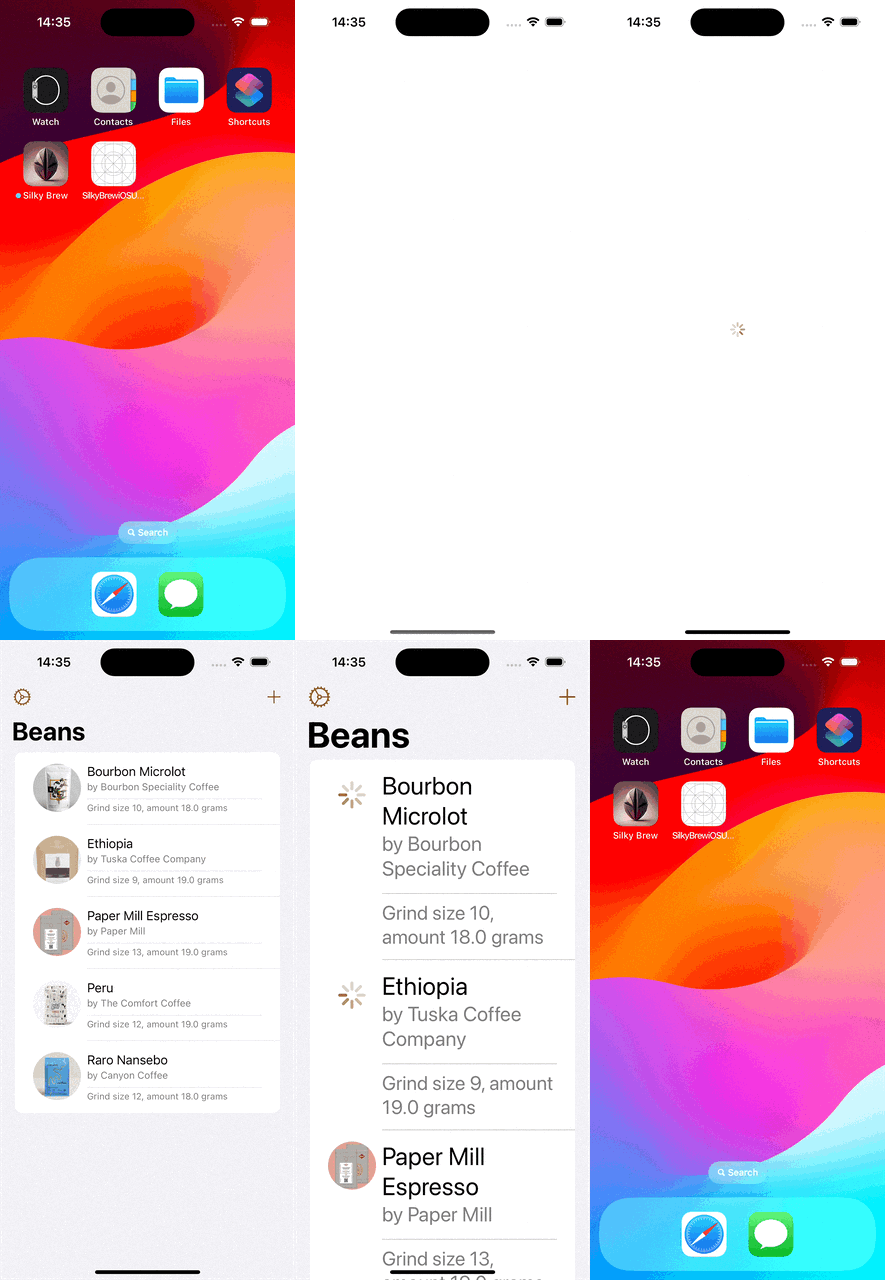
The test sets some environment keys which are used by the app to reconfigure some of its state. In the example above, we turn off onboarding view, speed up animations, and enable custom data (pre-defined user content). Here we can see how the test is running.

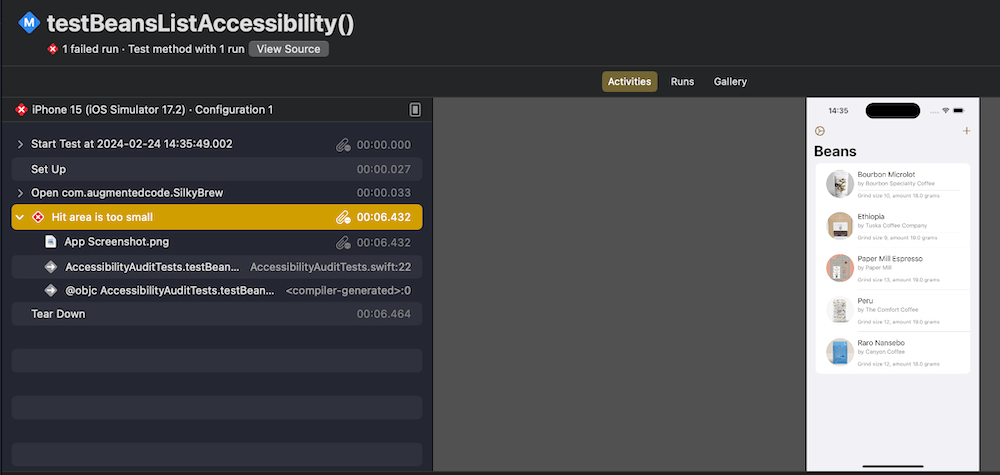
The accessibility audit did not come back without issues. One of the issues was a hitRegion problem. Report navigator shows more information about the failure.

After some trial and error, I found the issue triggering it. Not sure why, but the performAccessibilityAudit function failed to catch the element triggering the issue. Fortunately, accessibility indicator was able to pinpoint the element without a problem. So seems like if UI-tests catch accessibility issues but fail to highlight elements, then we can still go back to accessibility indicator for finding these. The particular issue was with the row view which shows several lines of text and two of these labels were using footnote and caption text styles. This in turn made text labels smaller and triggered the hitRegion error.

VStack(alignment: .leading) {
Text(beans.name)
Text("by \(beans.roastery)")
.font(.footnote)
.foregroundStyle(.secondary)
if let grindLabel {
Divider()
Text(grindLabel)
.font(.caption)
.foregroundStyle(.secondary)
}
}
view raw RowView.swift hosted with ❤ by GitHub

Since the row view is just multiple lines of text, then we can make it easier for accessibility users to read by combining all the text labels into one by adding .accessibilityElement(children: .combine) to the VStack. This solved that particular issue.

If this was helpful, please let me know on Mastodon@toomasvahter or Twitter @toomasvahter. Feel free to subscribe to RSS feed. Thank you for reading.

Categories
Swift SwiftUI

Opening hyperlinks in SwiftUI

Opening hyperlinks in UIKit with UILabel is unexpectedly complex, what about SwiftUI? In this post, we’ll dive into opening hyperlinks in SwiftUI.

If we just would like to show a hyperlink, then the best way is to the Link view. We can just feed it with a title and the destination URL. In addition, we can even apply a button style to it.

Link("Silky Brew", destination: AppConstants.URLs.silkyBrew)
  .buttonStyle(.borderedProminent)

By default, URLs are opened in the default web browser or if we are dealing with universal links, then in the appropriate app. If we have a desire to change how links are opened, we can apply a custom OpenURLAction. Here is an example how to open a URL in SFSafariViewController (SafariURL is just an Identifiable supported URL wrapper used for sheet’s binding and SafariView is SFSafariViewController wrapper with UIViewControllerRepresentable).

Link("Signal Path", destination: AppConstants.URLs.signalPath)
  .environment(\.openURL, OpenURLAction(handler: { url in
    safariURL = SafariURL(url: url)
    return .handled
}))
  .sheet(item: $safariURL, content: { safariURL in
    SafariView(url: safariURL.url) 
  })

Often we are dealing with a case where we have text which contains some links as well. In comparison to UIKit, it is way more simple. We can just use the Markdown syntax to define the link and that is all to it.

Text("Hello, world! Here is my [blog](https://augmentedcode.io/blog)")

If we would like to use a custom URL handler, then we can override the default handler through the openURL environment value. Can be handy to just have keys for URL in text and substituting these with actual URLs when handling the tap.

Text("Here are some apps: [Silky Brew](silky), [Signal Path](signal), and [Drifty Asteroid](drifty)")
                .environment(\.openURL, OpenURLAction(handler: { url in
                    switch url.absoluteString {
                    case "drifty": .systemAction(AppConstants.URLs.driftyAsteroid)
                    case "signal": .systemAction(AppConstants.URLs.signalPath)
                    case "silky": .systemAction(AppConstants.URLs.silkyBrew)
                    default: .systemAction
                    }
                }))

When talking about the OpenURLAction in greater detail, then the different return values are:

  • handled – handler took care of opening the URL (e.g. opening the URL in SFSafariViewController)
  • discarded – handler ignored the handling
  • systemAction – system handler opens the URL
  • systemAction(_:) – use a different URL (e.g. adding query parameters)

If this was helpful, please let me know on Mastodon@toomasvahter or Twitter @toomasvahter. Feel free to subscribe to RSS feed. Thank you for reading.